How this process works
A sale connects the customer, order, inventory, taxes, delivery and collection. Each effect occurs at the stage allowed by the business process and configuration.
Reference map: This diagram explains the business process. Automatic execution depends on licensed modules, permissions, settings and the installed version.
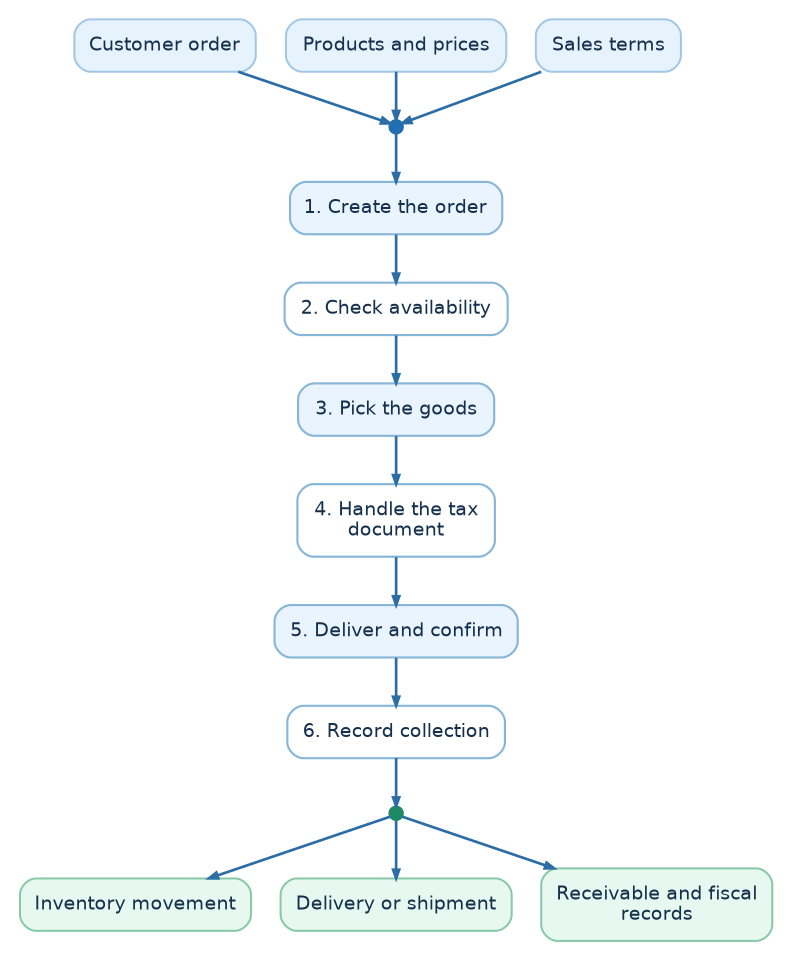
Where does the information come from?
- Customer order
- Products and prices
- Sales terms
What does the process produce?
- Inventory movement
- Delivery or shipment
- Receivable and fiscal records
Process steps explained
- Create the orderIdentify customer, products, quantities, prices and company.
- Check availabilityCheck stock and reserve items where supported.
- Pick the goodsPrepare the shipment or customer collection.
- Handle the tax documentIssue or link the required document when authorized.
- Deliver and confirmRecord dispatch and proof of delivery.
- Record collectionCreate or link the receivable or payment as appropriate.
Checks and special situations
- An open order is not proof of delivery.
- Reservation and stock issue are different movements.
- A fiscal failure must not be concealed by the sales status.
- Cancellation and returns must keep a reversal trail.
Important ruleTax, inventory and finance integration depends on contracts that are actually enabled.
Fields that explain this workflow
These identifiers are documentation proposals for future Shift+F1 integration. Publishing this page does not modify ERP fields or shortcuts.
| Field and key | Meaning | Source | Impact |
|---|---|---|---|
| Sales customerFIELD.VEN.ORDER.CUSTOMER | Customer responsible for the order. | Authorized customer record. | Links delivery, collection and history. |
| QuantityFIELD.VEN.ORDER.QUANTITY | Number of units on the sales line. | Customer agreement. | Affects inventory, billing and delivery. |
| DiscountFIELD.VEN.ORDER.DISCOUNT | Approved commercial reduction. | Pricing policy or approval. | Changes the amount and margin. |
| Delivery statusFIELD.VEN.ORDER.DELIVERY_STATUS | Stage of the shipping or delivery process. | Picking, dispatch and confirmation events. | Supports customer service and follow-up. |