How this process works
From purchase requirement to received goods or accepted services, each document has a distinct purpose. Goods receipts must not duplicate inventory movements or accounts payable.
Reference map: This diagram explains the business process. Automatic execution depends on licensed modules, permissions, settings and the installed version.
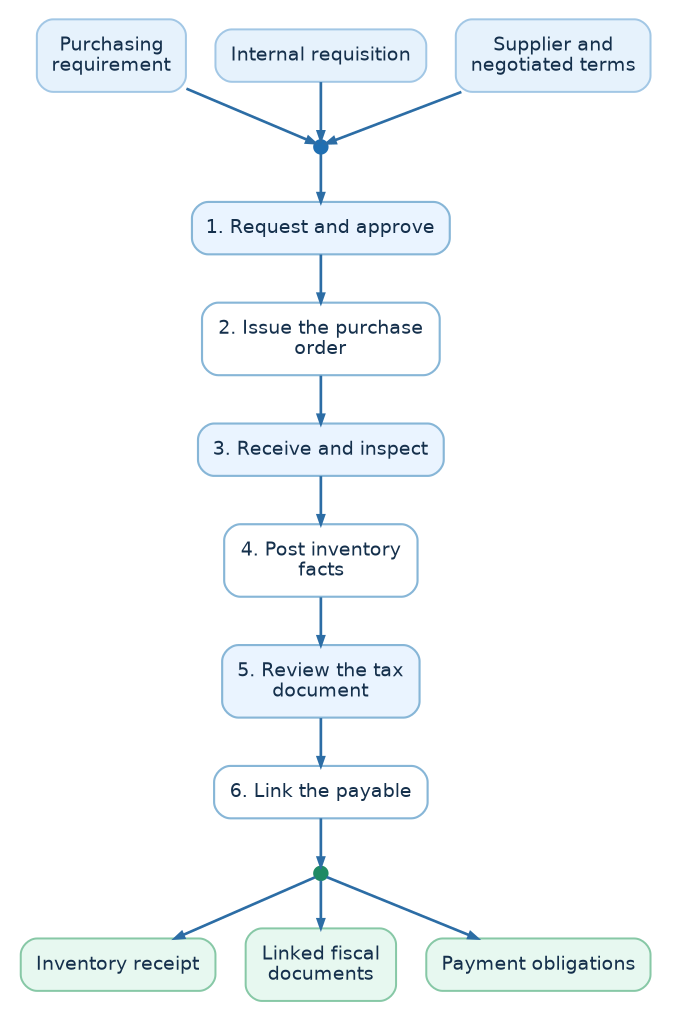
Where does the information come from?
- Purchasing requirement
- Internal requisition
- Supplier and negotiated terms
What does the process produce?
- Inventory receipt
- Linked fiscal documents
- Payment obligations
Process steps explained
- Request and approveSpecify the item, quantity, business purpose and approval authority.
- Issue the purchase orderRecord supplier, items, prices and delivery terms.
- Receive and inspectCompare full or partial deliveries against the order and documents; report discrepancies.
- Post inventory factsRecord physical receipt when applicable, once only.
- Review the tax documentLink the supplier invoice and tax information to the transaction.
- Link the payableCreate or associate the payable at the correct time without duplication.
Checks and special situations
- A purchase order, receipt and supplier invoice are linked records, not three debts.
- Partial deliveries retain the outstanding balance.
- Returned goods require controlled reversal.
- Delivery discrepancies must not be silently accepted.
Important ruleBusiness facts are shared only through the installation database; each domain owns its permitted writes.
Fields that explain this workflow
These identifiers are documentation proposals for future Shift+F1 integration. Publishing this page does not modify ERP fields or shortcuts.
| Field and key | Meaning | Source | Impact |
|---|---|---|---|
| SupplierFIELD.COM.PURCHASE.SUPPLIER | Person or company supplying the goods or services. | Authorized party records. | Links order, invoice and payment. |
| Purchased itemFIELD.COM.PURCHASE.ITEM | Product or service being ordered. | Catalog or approved free-form entry. | Supports receiving and classification. |
| Received quantityFIELD.COM.RECEIPT.ACCEPTED_QUANTITY | Quantity actually checked on arrival. | Physical counting and verification. | May affect stock and open order balance. |
| Received tax documentFIELD.COM.RECEIPT.INVOICE | Supplier invoice number, key or reference. | Document provided by the supplier. | Links purchasing, tax checks and the payable. |