How this process works
The fiscal process validates documents and their states, including rejection and cancellation. A prepared document is not yet an authorized tax document.
Reference map: This diagram explains the business process. Automatic execution depends on licensed modules, permissions, settings and the installed version.
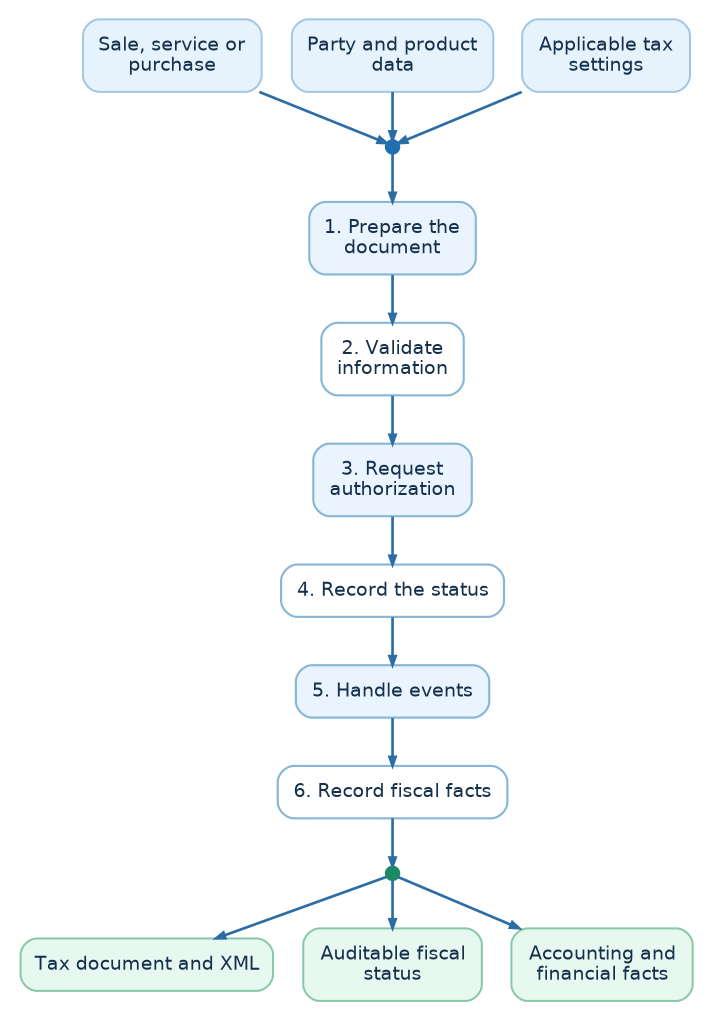
Where does the information come from?
- Sale, service or purchase
- Party and product data
- Applicable tax settings
What does the process produce?
- Tax document and XML
- Auditable fiscal status
- Accounting and financial facts
Process steps explained
- Prepare the documentCollect the authorized transaction and fiscal data.
- Validate informationCheck identifiers, taxes, items and required fields.
- Request authorizationSubmit to the external fiscal authority when enabled.
- Record the statusDistinguish pending, processing, authorized and rejected.
- Handle eventsRecord cancellation, correction or permitted follow-up events.
- Record fiscal factsMake verified fiscal information available for accounting and finance.
Checks and special situations
- Simulation is not fiscal authority authorization.
- Rejected documents must not be shown as authorized.
- Canceling a fiscal document does not automatically cancel every payable.
- Credentials and certificates must not appear in public documents.
Important ruleExternal authorization is available only when real fiscal-provider integration has been enabled.
Fields that explain this workflow
These identifiers are documentation proposals for future Shift+F1 integration. Publishing this page does not modify ERP fields or shortcuts.
| Field and key | Meaning | Source | Impact |
|---|---|---|---|
| Fiscal operation code (CFOP)FIELD.FIS.NFE.CONFIG.CFOP | Classifies the fiscal nature of the operation. | Operation and applicable tax rules. | Influences fiscal processing and reporting. |
| Access keyFIELD.FIS.NFE.DOCUMENT.KEY | Identifier of the fiscal document. | Authorized document process. | Enables traceability and verification. |
| Fiscal statusFIELD.FIS.NFE.DOCUMENT.STATUS | Current official processing state. | Verified authority response or event. | Determines permitted follow-up actions. |
| IssuerFIELD.FIS.NFE.DOCUMENT.ISSUER | Company issuing the document. | Authorized company context. | Determines fiscal identity and responsibility. |