How this process works
Amounts the company must pay can arise from purchases, taxes, payroll or approved obligations. Finance records each obligation once, monitors its due date and marks it as settled only when payment evidence exists.
Reference map: This diagram explains the business process. Automatic execution depends on licensed modules, permissions, settings and the installed version.
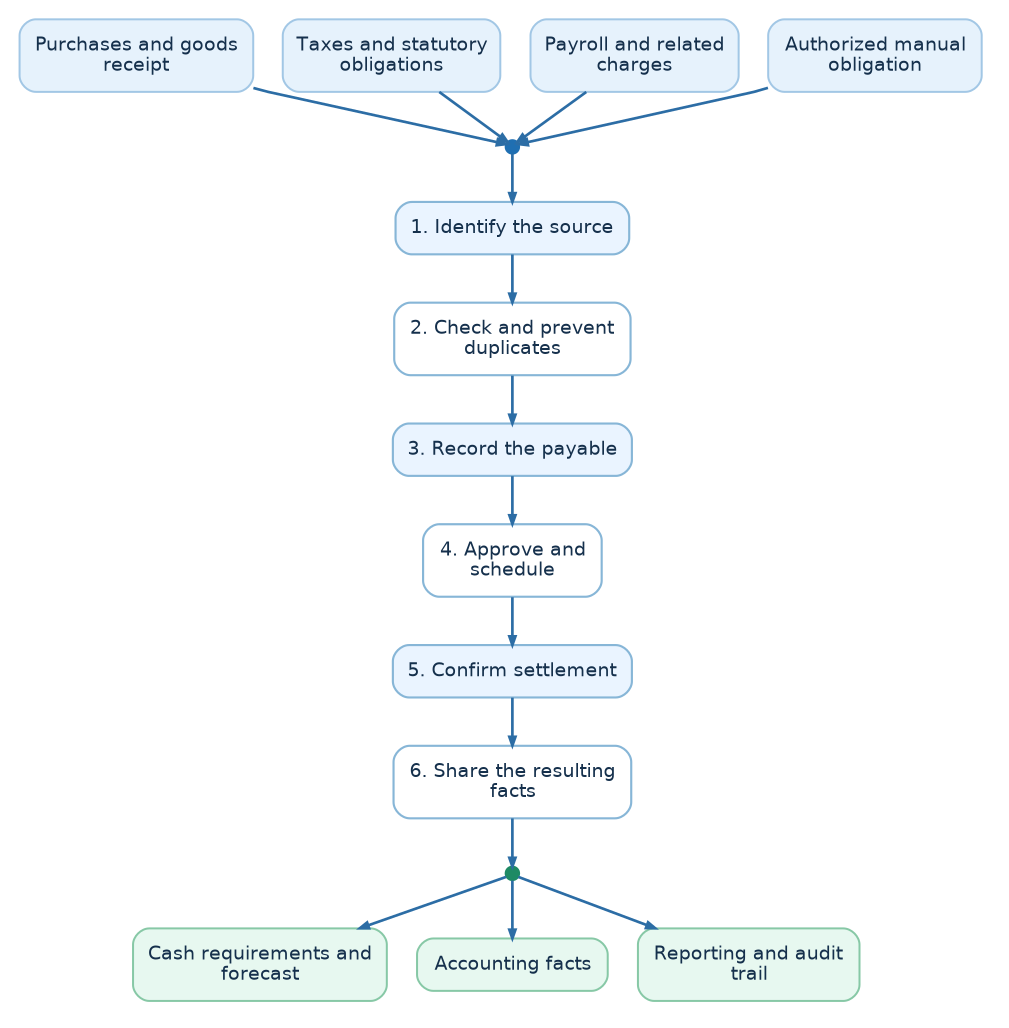
Where does the information come from?
- Purchases and goods receipt
- Taxes and statutory obligations
- Payroll and related charges
- Authorized manual obligation
What does the process produce?
- Cash requirements and forecast
- Accounting facts
- Reporting and audit trail
Process steps explained
- Identify the sourceFind the purchase order, receipt, tax, payroll or approval that created the obligation.
- Check and prevent duplicatesVerify company, payee, document, installments and source link. An invoice and its purchase order are not two separate debts.
- Record the payableCreate the obligation with amount, due date, status, cost center and source reference.
- Approve and scheduleApply approval limits and select the payment date and method. Scheduling is not payment.
- Confirm settlementRecord full or partial payment only with evidence; track reversals.
- Share the resulting factsMake authorized facts available for cash management, accounting and reporting.
Checks and special situations
- A purchase, receipt and supplier invoice may refer to the same debt: do not create duplicate payables.
- A schedule, bank instruction or payment intent does not prove settlement.
- Partial payments, cancellation, interest and reversals must retain the payable history.
- Every query and entry must respect the authorized installation and company.
Important ruleDocuments and facts are shared through the installation PostgreSQL database; a module being present does not mean that automation is active.
Fields that explain this workflow
These identifiers are documentation proposals for future Shift+F1 integration. Publishing this page does not modify ERP fields or shortcuts.
| Field and key | Meaning | Source | Impact |
|---|---|---|---|
| Source documentFIELD.FIN.PAYABLE.SOURCE | Identifies the business fact that created the payable. | Purchase, tax, payroll or approved manual entry. | Supports audits and prevents duplicate posting. |
| Due dateFIELD.FIN.PAYABLE.DUE_DATE | Date by which the obligation should be paid. | Purchase terms or the source document, subject to review. | Drives alerts and payment scheduling. |
| Payable amountFIELD.FIN.PAYABLE.AMOUNT | Amount owed for the payable or installment. | Source document, calculation and approved adjustments. | Affects cash forecasts; does not prove payment. |
| Cost centerFIELD.FIN.PAYABLE.COST_CENTER | Management unit responsible for the expense. | Configuration or classification by an authorized user. | Enables management reports; not a substitute for accounting. |
| Payable statusFIELD.FIN.PAYABLE.STATUS | Shows open, overdue, partially paid, settled or canceled. | Approved creation, settlement or reversal events. | Updates payable balances and the audit trail. |