How this process works
A customer request may lead to a service order, work performed and customer acceptance. Billing and after-sales depend on the actual service delivered.
Reference map: This diagram explains the business process. Automatic execution depends on licensed modules, permissions, settings and the installed version.
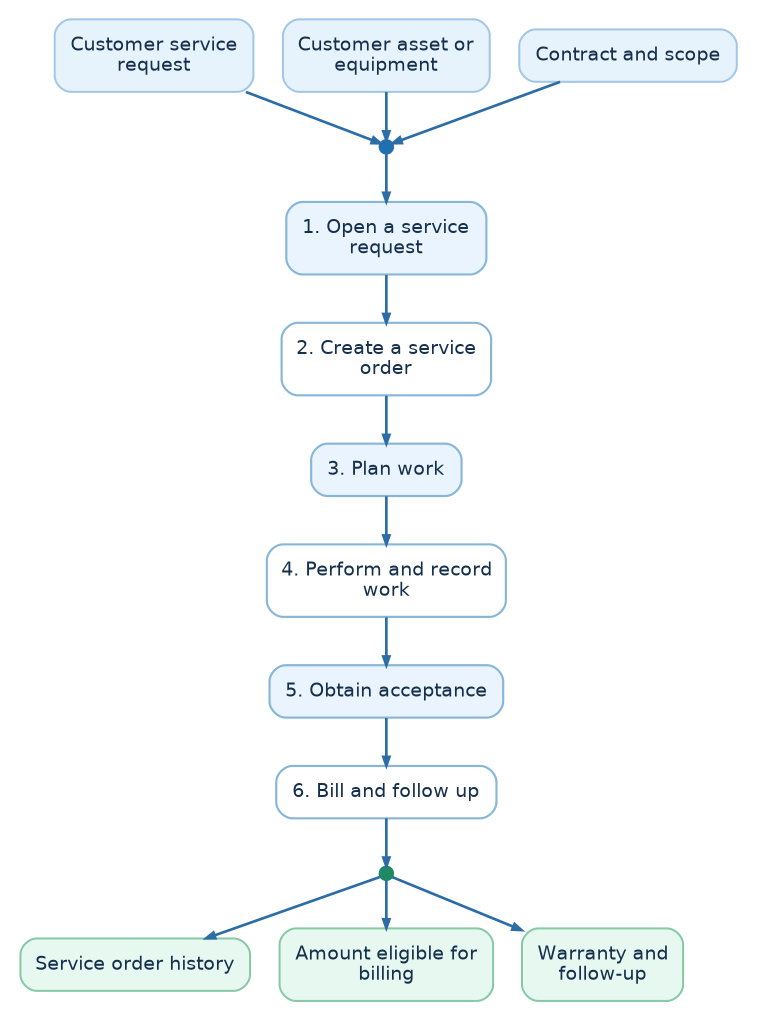
Where does the information come from?
- Customer service request
- Customer asset or equipment
- Contract and scope
What does the process produce?
- Service order history
- Amount eligible for billing
- Warranty and follow-up
Process steps explained
- Open a service requestCapture the problem, customer and priority.
- Create a service orderDefine the scope and link the relevant asset.
- Plan workAssign a team, time and necessary materials.
- Perform and record workRecord labor, materials, observations and evidence.
- Obtain acceptanceCapture approval or justified refusal.
- Bill and follow upLink billing, warranty and after-sales activities where applicable.
Checks and special situations
- An open service order is not completed work.
- Reserved material must not be consumed twice.
- Service acceptance and billing may require different approvals.
- Reopening and warranty must retain the original service order link.
Important ruleCustomer assets and workforce fields appear only when the related modules and permissions are enabled.
Fields that explain this workflow
These identifiers are documentation proposals for future Shift+F1 integration. Publishing this page does not modify ERP fields or shortcuts.
| Field and key | Meaning | Source | Impact |
|---|---|---|---|
| CustomerFIELD.SRV.ORDER.CUSTOMER | Person or company requesting the service. | Authorized party record. | Links order, billing and support. |
| Serviced assetFIELD.SRV.ORDER.ASSET | Equipment or asset being serviced. | Customer asset record. | Supports history and warranty. |
| Assigned technicianFIELD.SRV.ORDER.TECHNICIAN | Worker responsible for the service. | Staff scheduling and permission. | Supports accountability and labor recording. |
| AcceptanceFIELD.SRV.ORDER.ACCEPTANCE | Customer approval of work performed. | Verified completion and customer response. | Supports billing and after-sales. |